

Reference implementation
Browse the full push-notification sample (Flutter + native iOS glue) to diff or copy files.
The steps below refer to the folder names inside the sample repo (for example
lib/notifications
or
ios/Runner/AppDelegate.swift).
Copy the same structure into your project and only change identifiers (bundle ID, provider IDs, package name) to match your app.
Architecture map
| Sample path | Role inside the app | What to copy/replicate |
|---|---|---|
lib/notifications | Models, platform services, push registry helpers, MethodChannel bridge handlers | Copy the directory as-is when starting a new app; keep the folder boundaries so imports resolve. |
lib/main.dart | Initializes Firebase, SharedPreferences, local notifications, and wires APNSService.setupNativeCallListener | Reuse the launch sequence so notification taps from a terminated state reach Flutter before runApp. |
lib/dashboard.dart / lib/guard_screen.dart | Boots CometChat UI Kit, requests permissions, registers Call/Notification listeners | Mirror the lifecycle hooks to initialize APNSService only once and capture pending notification taps. |
ios/Runner/AppDelegate.swift | PushKit + CallKit bridge plus MethodChannel glue for VoIP token + call events | Start from the sample file and update the bundle identifiers or localized strings. |
lib/notifications/services/pn_registry.dart | Wraps CometChatNotifications.registerPushToken for APNs, VoIP, and FCM | Supply your CometChat provider IDs so registration works in every environment. |
1. Prerequisites
- Apple Developer account with Push Notifications, Background Modes, and VoIP entitlements for your bundle ID.
- Firebase project with an iOS app configured (
GoogleService-Info.plistinside the Runner target) and Cloud Messaging enabled. - CometChat app credentials (App ID, Region, Auth Key) plus Push Notification extension enabled with APNs + VoIP providers created.
- Flutter 3.24+ / Dart 3+, the latest CometChat UI Kit (
cometchat_chat_uikit) and Calls UI Kit (cometchat_calls_uikit) packages. - Physical iPhone or iPad for testing—simulators cannot receive VoIP pushes or present CallKit UI.
2. Prepare credentials before coding
2.1 Apple Developer portal
- Generate an APNs Auth Key (
.p8) and note the Key ID and Team ID. - Enable Push Notifications plus Background Modes → Remote notifications and Voice over IP on the bundle ID.
- Create a VoIP Services certificate/key if you want separate credentials.
2.2 Firebase Console
- Register the same bundle ID and download
GoogleService-Info.plist. - Enable Cloud Messaging and, if needed, APNs authentication key under Project Settings → Cloud Messaging.
2.3 CometChat dashboard
- Turn on the Push Notifications extension (V2).
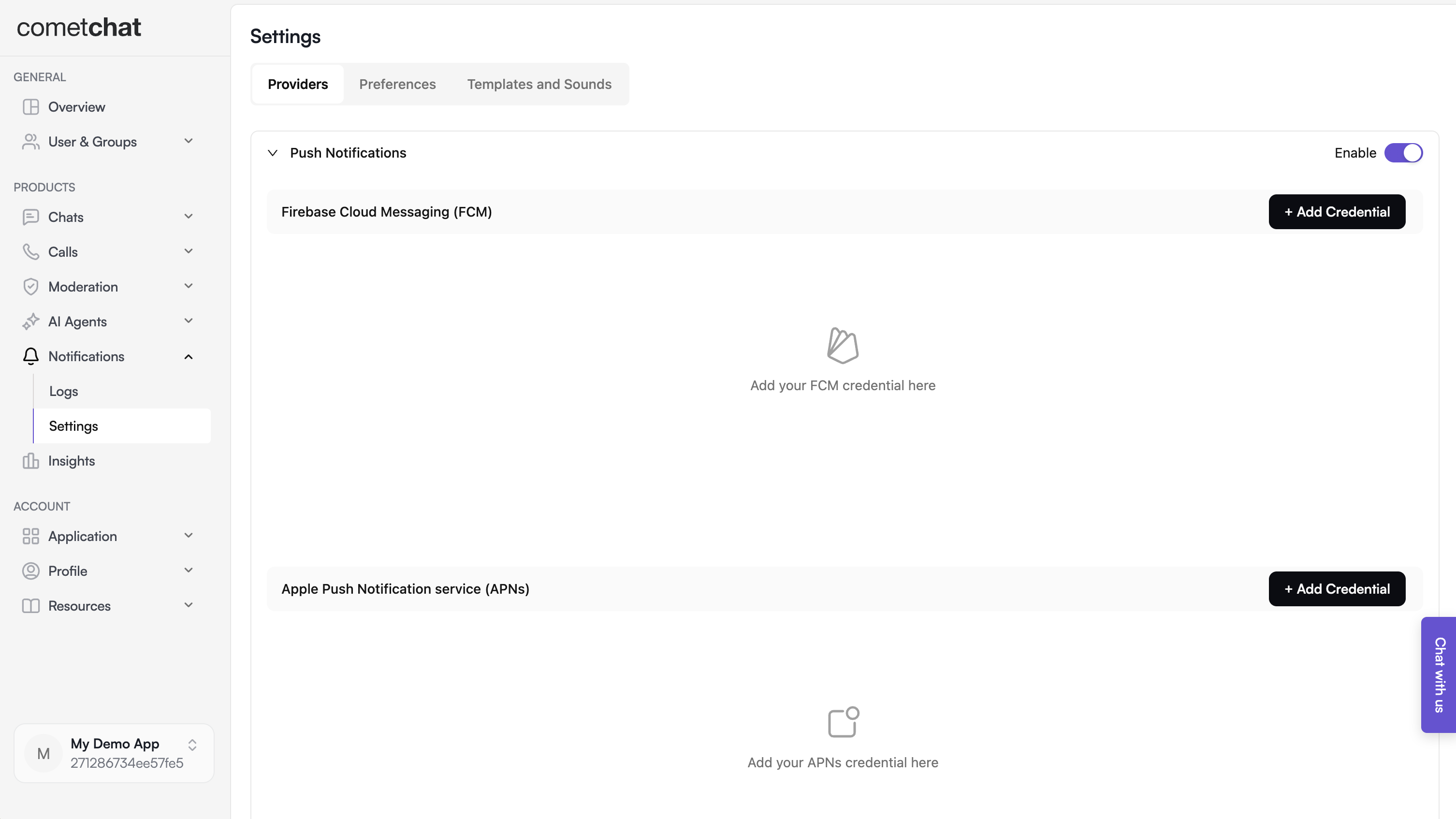
- Create one provider for APNs device pushes and (optionally) another for VoIP pushes.

- Copy the generated provider IDs—they are required inside
CometChatConfig.
2.4 Local configuration files
Updatelib/cometchat_config.dart (or your own config file) so it exposes:
3. Bring the notification stack into Flutter
3.1 Copy lib/notifications
- Clone or download the sample once.
- Copy the entire
lib/notificationsdirectory (models, Android/iOS services, helpers) into your app. - Update the import prefixes (for example replace
package:flutter_application_demo/...with your own package name). Keeping the same folder names avoids manual refactors later.
3.2 Wire the entry points
lib/main.dart
- Initialize
SharedPreferencesClass, Firebase, andFlutterLocalNotificationsPluginbefore callingrunApp. - Store
NotificationLaunchHandler.pendingNotificationResponsewhen the app is opened by tapping a notification while terminated. - On iOS, call
APNSService.setupNativeCallListener(context)frominitStateso Flutter reacts when the native CallKit UI changes state.
lib/guard_screen.dart / lib/dashboard.dart (or your first screen after login)
- Ensure
CometChatUIKit.init()andCometChatUIKit.login()finish before rendering the dashboard. - Instantiate
APNSService(iOS only) and callapnsService.init(context)insideinitState. - Register CometChat UI + Calls listeners (
CometChatUIEventListener,CometChatCallEventListener, andCallListener) exactly once per session; the sample stores the listener IDs insideAPNSService. - Replay
NotificationLaunchHandler.pendingNotificationResponseafter the widget tree builds so taps from a killed app still navigate toMessagesScreen. - Forward lifecycle changes to
IncomingCallOverlay/BoolSingletonto hide stale overlays when the app resumes.
3.3 Align dependencies and configuration
Mirror the samplepubspec.yaml versions (update as needed when newer releases ship):
flutter pub get, then flutterfire configure if you still need to generate firebase_options.dart.
4. Configure the native iOS layer
4.1 Capabilities and Info.plist
- Open
ios/Runner.xcworkspacein Xcode. - Under Signing & Capabilities, enable Push Notifications and Background Modes (Remote notifications + Voice over IP).
- Add microphone, camera, Bluetooth, and notification permission strings to
Info.plist. - Set the development team that has access to the APNs/VoIP keys you generated earlier.
4.2 AppDelegate.swift bridge
Start from the sample ios/Runner/AppDelegate.swift and keep these pieces intact:
- MethodChannel handshake – create a channel that both Flutter and Swift know:
getAppInfo, endCall, onCallAcceptedFromNative, and onCallEndedFromNative, mirroring the Dart side (APNSService.setupNativeCallListener).
- Firebase + plugin registration – call
FirebaseApp.configure()beforeGeneratedPluginRegistrant.register(with: self). - PushKit – instantiate
PKPushRegistry, setdesiredPushTypes = [.voIP], and forward the token insidepushRegistry(_:didUpdate:for:)viaSwiftFlutterCallkitIncomingPlugin.sharedInstance?.setDevicePushTokenVoIP(tokenHex). - CallKit – configure
CXProviderConfiguration, keep aCXCallController, and implementprovider(_:perform: CXAnswerCallAction)/provider(_:perform: CXEndCallAction)so native actions propagate to Flutter. - Incoming push handler – inside
pushRegistry(_:didReceiveIncomingPushWith:), convert the CometChat payload intoflutter_callkit_incoming.Data, setextrawith the raw payload, and callshowCallkitIncoming(..., fromPushKit: true). - UUID helper – reuse
createUUID(sessionid:)to produce validUUIDs from long CometChat session IDs; this lets CallKit correlate calls even if the payload string exceeds 32 characters.
APNSService.platform in Dart to match.
5. Token registration and runtime events
5.1 Standard APNs tokens
APNSService hooks into FirebaseMessaging.instance.getAPNSToken() (and onTokenRefresh) before calling:
CometChatConfig.apnProviderId.
5.2 VoIP tokens
- Capture the PushKit token in
AppDelegate.pushRegistry(_:didUpdate:for:). - Forward it to Flutter via the MethodChannel or register it directly from Swift by invoking
CometChatPushRegistrythroughSwiftFlutterCallkitIncomingPlugin. - If you keep the Dart implementation, emit a MethodChannel call named
onVoipTokenand handle it inAPNSServiceby callingCometChatPushRegistry.register(token: token, isFcm: false, isVoip: true);.
5.3 Local notifications and navigation
APNSService._showNotificationdisplays a local notification when the incoming CometChat message does not belong to the currently open conversation.LocalNotificationService.handleNotificationTapparses the payload, fetches the relevant user/group, and pushesMessagesScreen.NotificationLaunchHandler.pendingNotificationResponsecaches taps triggered while the app is terminated; replay it on the dashboard once the UI is ready.
5.4 Call events
FlutterCallkitIncoming.onEventis already wired insideAPNSServiceto accept or end calls initiated by CallKit.- When native CallKit UI accepts/ends a call, Swift invokes
onCallAcceptedFromNative/onCallEndedFromNativeon the MethodChannel;APNSServicethen callsFlutterCallkitIncoming.setCallConnectedorCometChat.endCall()to keep both stacks synchronized.
6. Testing checklist
- Run the app on a physical device in debug first. Grant notification, microphone, camera, and Bluetooth permissions when prompted.
- From the CometChat Dashboard, send a standard message notification. Verify:
- Foreground: a local notification banner shows (unless you are in that chat).
- Background: APNs notification appears, tapping opens the right conversation.
- Force-quit the app, send another message push, tap it, and confirm
NotificationLaunchHandlerlaunchesMessagesScreen. - Trigger an incoming CometChat call. Ensure:
- CallKit UI shows contact name, call type, and Accept/Decline.
- Accepting on the lock screen notifies Flutter (
setupNativeCallListener), starts the call session, and dismisses the native UI when the call ends.
- Decline the call and confirm both CallKit and Flutter clean up (
BoolSingletonresets, overlays dismissed). - Rotate through Wi-Fi/cellular and reinstall the app to confirm token registration works after refresh events.
7. Troubleshooting tips
| Symptom | Quick checks |
|---|---|
| No VoIP pushes | Entitlements missing? Ensure Push Notifications + Background Modes (VoIP) are enabled and the bundle ID matches the CometChat provider. |
| CallKit UI never dismisses | Make sure endCall(callUUID:) reports to CXProvider, runs a CXEndCallAction, and calls SwiftFlutterCallkitIncomingPlugin.sharedInstance?.endCall. |
| Flutter never receives native call events | Confirm the MethodChannel names match between Swift and Dart, and APNSService.setupNativeCallListener runs inside initState. |
| Token registration errors | Double-check CometChatConfig provider IDs, and verify you call registerPushToken after CometChatUIKit.login succeeds. |
| Notification taps ignored | Ensure you replay NotificationLaunchHandler.pendingNotificationResponse after the navigator key is ready (typically WidgetsBinding.instance.addPostFrameCallback). |